

Built to partner at scale

Working with technology, solution, and integration partners to help retailers deliver smarter loyalty and personalization.

mach-member-certifiedGoogle Cloud Premier Technology Partner


Become a partner

Explore how we work with partners to build, integrate, and scale loyalty and personalization for retailers.

We're the personalization people.

Our technology helps retailers design and manage world-class loyalty programs that capture rich first-party data - and then applies built-for-retail AI to deliver 1:1 personalization at scale.

3 min read

How EagleAI Cut Google Cloud Storage Costs by 50%

TL;DR

How EagleAI Cut Google Cloud Storage Costs by 50% is a technical cost-optimization case study for data, AI, and engineering teams operating at scale. The article explains how cloud cost analytics, GCS lifecycle policies, and data management best practices reduced storage spend while maintaining AI data processing and operational efficiency.
How EagleAI Cut Google Cloud Storage Costs by 50%
5:40

At EagleAI, we process several terabytes of data every day - both as inputs to our predictive AI models and as outputs to personalize the offers we recommend to our clients. A significant portion of that data is stored on Google Cloud Storage (GCS), and if left unchecked, storage costs can quietly become a major drain on our cloud budget.

In this article, I’ll show you how we identified a misconfigured bucket - replicated across multiple projects - that was responsible for the majority of our GCS costs. By making a few simple adjustments, we managed to reduce those costs by 80% for the affected buckets, and by 50% across all GCS usage!

Monitoring GCP Costs Shouldn't Be an Afterthought

If your business is running at scale, you probably have multiple GCP projects - different dev environments, clients, or teams - with similar resources replicated across them (BigQuery datasets, Cloud Run apps, GCS buckets, etc.).

Tracking costs in detail can be a real headache, especially with GCS where bucket names must be globally unique. In this context, how do you group similar resources across projects to understand their combined impact?

GCP provides several tools to help, if you follow a few best practices:

  • Add labels to your resources - using consistent keys and values across projects. For example, buckets used to store temporary files could be labeled (e.g. gs_bucket: temporary)
  • Enable cost export to BigQuery
  • Create a Looker Studio dashboard (formerly Data Studio) to group costs by label, filter by project or resource type, and visualize trends. GCP even provides ready-to-use dashboards that you can deploy in just a few minutes.

Monitoring GCP Costs

Using these practices, we quickly discovered that a single bucket - replicated across multiple projects - was responsible for more than 60% of our total GCS costs.

How We Built an Efficient Bucket Cleanup Strategy

Step 1: Inventory Your Bucket Contents

Before changing anything, you need a more granular view of what’s stored in your bucket - so you can safely reconfigure things without accidentally deleting critical files.

Fortunately, GCP provides the gcloud storage CLI tool (which recently replaced gsutil) to retrieve file metadata and analyze storage usage. You can use it to:

  • Calculate data volume for each folder → to identify the costliest folders.
  • Check last modified or creation date for files → to locate legacy folders that haven’t been updated in months and may be candidates for deletion.

Here's a simplified example to estimate folder sizes:

$ gcloud storage du -a -r -s $(gcloud storage ls gs://[BUCKET_NAME]/)

Then, gather the relevant teams that use the bucket and determine the appropriate lifecycle for each folder. To make things easier, follow these guiding questions:

  • Which files must never be deleted (e.g. for legal compliance)?
  • How long should files remain available for reading? For archiving?
  • Do we need access to previous versions of the same file?
  • For partitioned files, how many partitions should you keep?

Step 2: Configure Bucket Policies

GCS offers a wide range of configuration options to manage file retention, versioning, and cost. Based on our experience, here are some best practices:

  • Move critical files to a dedicated bucket, and ensure all future usage (write/read)  go directly there.
  • Enable object versioning only if needed - not to recover accidentally deleted files, but only when you need historical versions.
  • Enable soft delete with a retention period suited to your use case.
💡 Soft delete is a new GCP feature introduced in March 2024 that lets you recover deleted files during a defined retention window.
  • Use lifecycle rules to transition infrequently accessed files from Standard to cheaper storage classes like Nearline, Coldline, or Archive.

💡 Beware of minimum storage duration requirements! For example, files moved to Archive must be stored for at least one year before deletion. Moreover operations on those files such as listing or reading are more expensive.

  • Automatically delete old files based on time since creation.
  • Apply prefix/suffix-based lifecycle rules to enforce stricter cleanup policies on the heaviest folders.

💡Prefix and suffix-based lifecycle rules were introduced in August 2022 to apply custom conditions on specific folders and file extensions.

Example configuration we use today:

  • Lifecycle rules:
    • Transition to Coldline after 90 days.
    • Delete after 1 year.
  • Special rules for large folders (based on a predefined list of prefixes):
    • Delete after 90 days.
  • Soft delete enabled, with a 7-day retention window.
  • Object versioning disabled.

💡 In case of conflict, deletion rules take precedence over class transitions. So in this setup, a file in a high-volume folder will be deleted after 3 months, even if it's eligible for Coldline transition.

Immediate Results

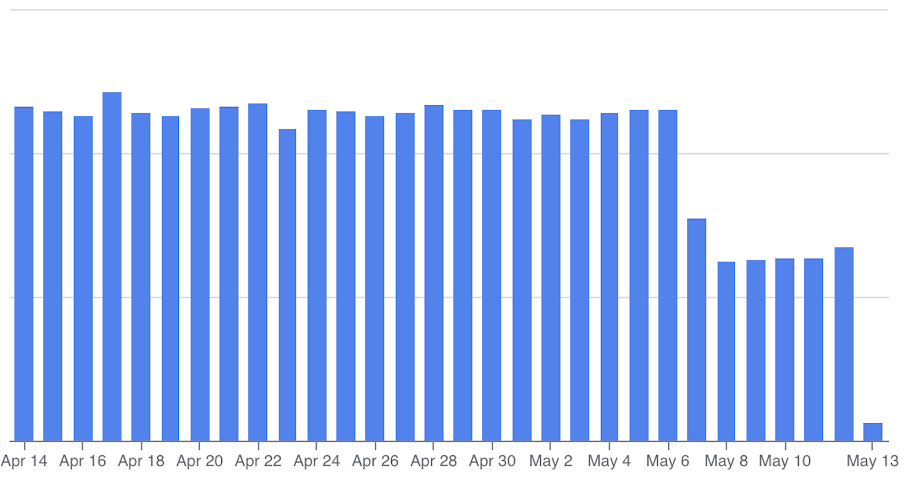
Evolution of GCS storage costs

Legend: Evolution of GCS storage costs before and after applying lifecycle and soft-delete policies.

By applying these configurations to our most expensive buckets, we achieved an 80% reduction in their storage costs, representing a 50% drop in our overall GCS expenses!

Final Thoughts

While GCS storage might seem cheap compared to other GCP components (like BigQuery analysis, Compute CPUs and RAMs usage,..), it can silently become a major line item over time - especially if left unmanaged.

The good news? With the right tooling and a few easy-to-implement practices, controlling GCS costs is both simple and impactful.

Get the latest insights, research, and news delivered straight to your inbox.

Plus, enter to win the 2nd edition of Omnichannel Retail by Tim Mason & Sarah Jarvis!

No spam. We promise. 💜

How we optimized Cloud Run Networking with Direct VPC Egress

4 min read

How we optimized Cloud Run Networking with Direct VPC Egress

Learn how EagleAI optimized Cloud Run networking with Direct VPC Egress, reducing costs and improving performance for their AI-driven loyalty platform.

AI Brings Retailers Closer to the Holy Grail of Offer Personalization

1 min read

AI Brings Retailers Closer to the Holy Grail of Offer Personalization

AI could help retailers deliver the holy grail of offers—real-time, one-to-one personalization—transforming customer engagement and loyalty outcomes.

Spark or BigQuery? Why We Chose… Both

9 min read

Spark or BigQuery? Why We Chose… Both

Discover how Eagle AI blends Spark and BigQuery for optimal data processing - balancing speed, flexibility, and maintainability